
Cufón - Font Replacement
 Version: 1.1.1
 Plugin
There are a number of different solutions to display non-web based fonts on a website. Cufón is a JavaScript based solution that requires no flash or images. We have created a plugin that uses Cufón to display your fancy fonts.
Description
The h1 & componentheading and h2 & contentheading CSS selectors are using Cufón on this website. The plugin will allow you to have four different fonts for different selectors.
Installation & Upgrading
Installation & Upgrade Instructions
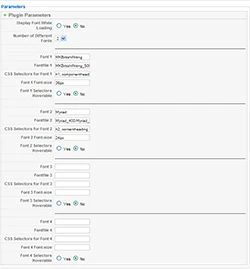
KC Cufón Font Replacement Plugin Parameters
Follow these instructions to install the plugin for the first time or to upgrade to a new version of the plugin.
- Login to the backend of your Joomla! site as an Administrator or Super Administrator
- Under the Extensions menu go to Install/Uninstall
- Click the Browse button in the Upload Package File box
- Find the plugin_kc_cufon x.x.x.zip file that you previously stored on your hard drive and click Open
- Click the Upload & Install button beside the Browse button
- The plugin will be installed
- Under the Extensions menu go to Plugin Manager
- Find the plugin_kc_cufon plugin and enable it, change Enabled: to Yes
- If you have a Google Analytics plugin installed position it after the kc_cufon plugin in the Plugin Manager list.
Usage
Usage Instructions
- Before changing the font files, make sure that Cufón is working with the default fonts. So, make sure the plugin is Enabled and the Number of Different Fonts is set to 2.
- Go to the frontend of your site and refresh it. You should now see your h1 and h2 tags in the Cufón fonts. If the Cufón fonts are showing continue on with the Usage Instructions, if they aren't you need to get this working before continuing.
- To use the plugin you just need to create your Cufón font file(s). Visit the Cufón generator to create your Cufón font file.
- Upload the font files to /plugins/system/kc_cufon/fonts folder.
- Then set the plugin parameters to use the font files and specify which selectors are to use those font files.
- You can set your CSS selectors for the fonts as you normally would using your normal CSS stylesheets.
- You must use a Strict doctype in order for Cufón to work in IE browsers. All Cufón-enabled pages must be UTF-8 encoded. Compatible encodings, such as US-ASCII, are also fine.
- Detail information and documentation about Cufón can be found at the Cufón site.